Using the JustSERP API with JavaScript: Basic and Advanced Examples
Get Google search results into JavaScript with one fetch call. Basic examples, plus location targeting, pagination, mobile results, time filters, retries and parallel searches.
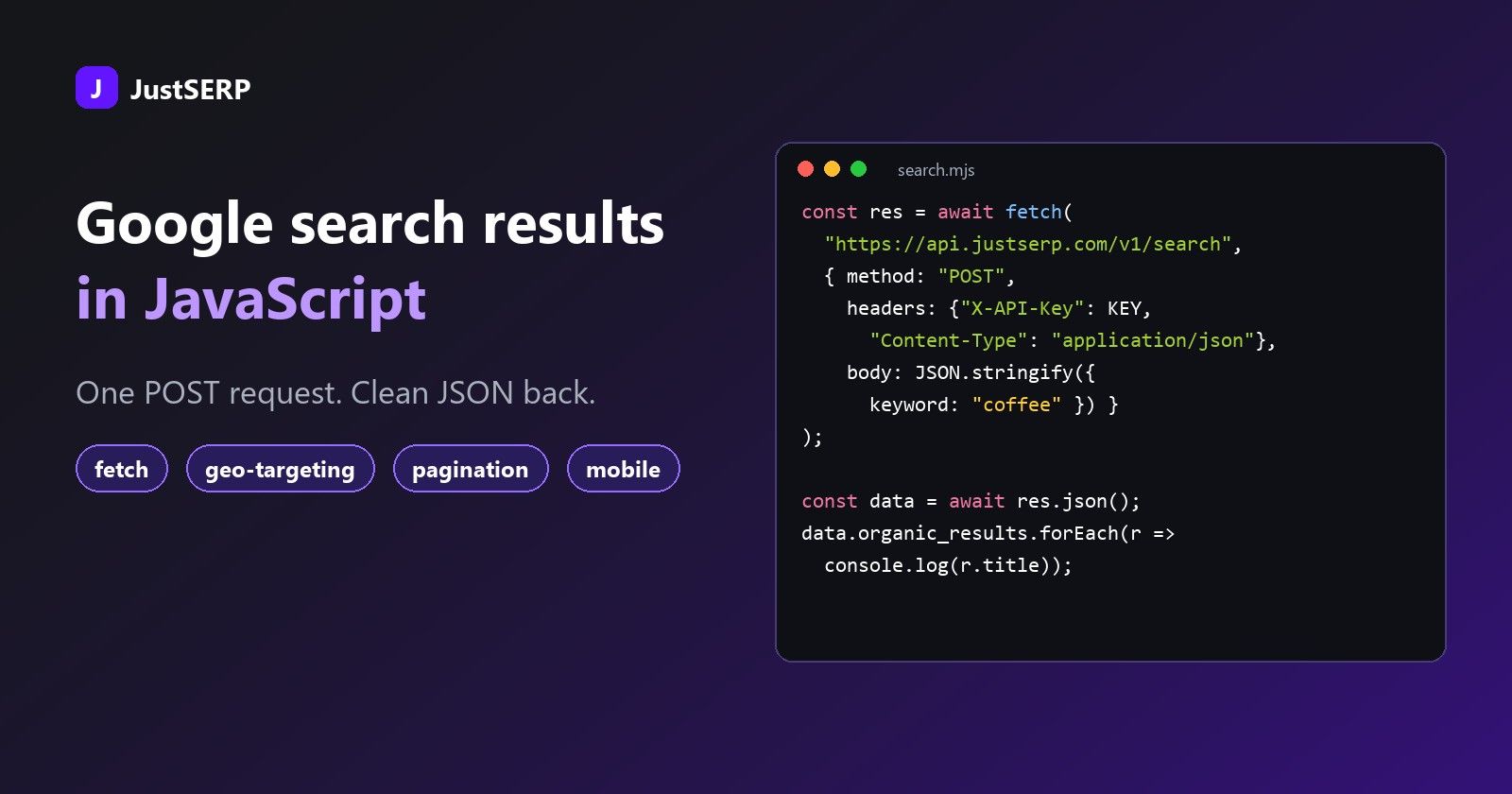
Getting Google results into a JavaScript app should take a few lines, not a weekend of proxies, CAPTCHAs and HTML parsing. With the JustSERP API it is one POST request and a JSON answer. This guide walks from a first request to the advanced parameters: location targeting, pagination, mobile results, time filters and more. Every example uses the built-in fetch, so there is nothing to install.
What you need
- Node.js 18 or newer, which includes
fetch. The examples are ES modules, so save them as.mjsfiles or set"type": "module"in yourpackage.json. - A JustSERP API key. Sign up, then copy the key from your dashboard.
Keep the key out of your source code. Read it from an environment variable:
export JUSTSERP_API_KEY="your-key-here"Call the API from your server, not from browser code. Anything running in a visitor's browser exposes your key. Put the call in a Node script, an API route or a serverless function and send your own front end the results.
How a request works
You send a keyword and any options as JSON to https://api.justserp.com/v1/search. JustSERP fetches the Google results page, parses it, and sends back clean JSON. One request returns one results page.
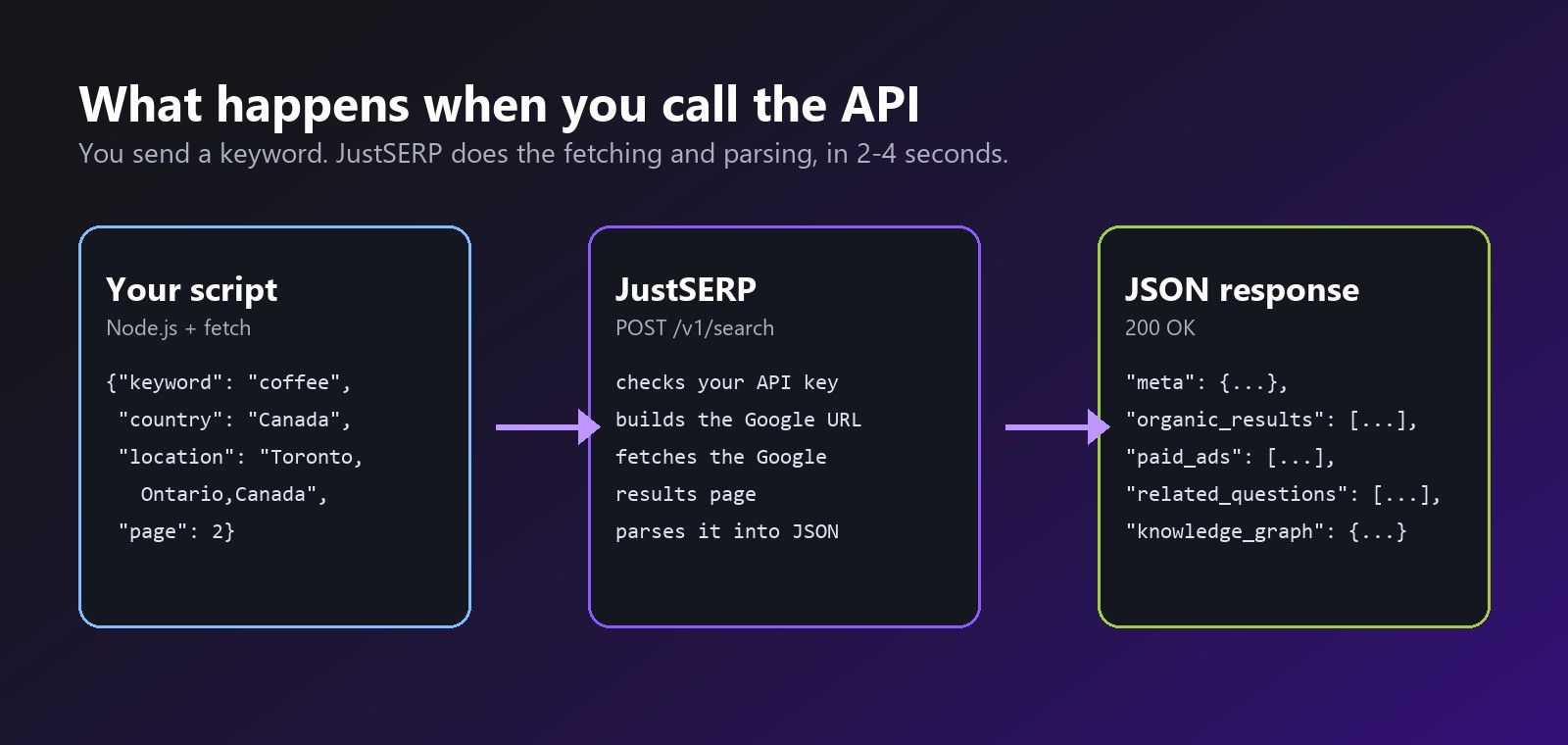
A typical request takes 2 to 4 seconds, and because each search is quick you can run many of them in parallel, as the concurrency section below shows.
Your first request
Send the key in the X-API-Key header and the search in the JSON body. Only keyword is required.
const API_URL = "https://api.justserp.com/v1/search";
const API_KEY = process.env.JUSTSERP_API_KEY;

const response = await fetch(API_URL, {
  method: "POST",
  headers: {
    "X-API-Key": API_KEY,
    "Content-Type": "application/json",
  },
  body: JSON.stringify({ keyword: "best coffee grinder" }),
  signal: AbortSignal.timeout(30_000),
});

if (!response.ok) throw new Error(`${response.status}: ${await response.text()}`);
const data = await response.json();

for (const result of data.organic_results) {
  console.log(result.position, result.title);
  console.log("   ", result.link);
}
Always set a timeout. AbortSignal.timeout() cancels the request after the given time so a stuck connection can never hang your script. Thirty seconds is plenty.
What comes back
The answer is a JSON object. A block only appears when Google showed it on that page, so default optional blocks to an empty value.
{
  "meta": {
    "status": 200,
    "query": "best coffee grinder",
    "device": "desktop",
    "googleURL": "https://www.google.com/search?...",
    "params": { "keyword": "best coffee grinder" },
    "time_taken": "3.41"
  },
  "totalResults": 48200000,
  "organic_results": [
    { "position": 1, "title": "...", "link": "https://...", "description": "..." }
  ],
  "paid_ads": [ { "position": 1, "title": "...", "link": "...", "description": "..." } ],
  "related_questions": [ "What is the best grinder for espresso?" ],
  "related_search": [ "best burr coffee grinder" ],
  "knowledge_graph": { "title": "...", "description": "..." },
  "inline_videos": [ { "position": 1, "source": "..." } ]
}
Here is how to pull the useful parts out safely, using optional chaining and defaults:
const organic = data.organic_results ?? [];
const ads = data.paid_ads ?? [];
const peopleAlsoAsk = data.related_questions ?? [];
const related = data.related_search ?? [];
const knowledge = data.knowledge_graph ?? null;

console.log(`${organic.length} organic results, ${ads.length} ads`);
for (const question of peopleAlsoAsk) {
  console.log("People also ask:", question);
}
Advanced parameters
Every option goes in the same JSON body. To keep the examples short, they all use this small helper:
async function search(keyword, options = {}) {
  const response = await fetch(API_URL, {
    method: "POST",
    headers: { "X-API-Key": API_KEY, "Content-Type": "application/json" },
    body: JSON.stringify({ keyword, ...options }),
    signal: AbortSignal.timeout(30_000),
  });
  if (!response.ok) throw new Error(`${response.status}: ${await response.text()}`);
  return response.json();
}
Country and language
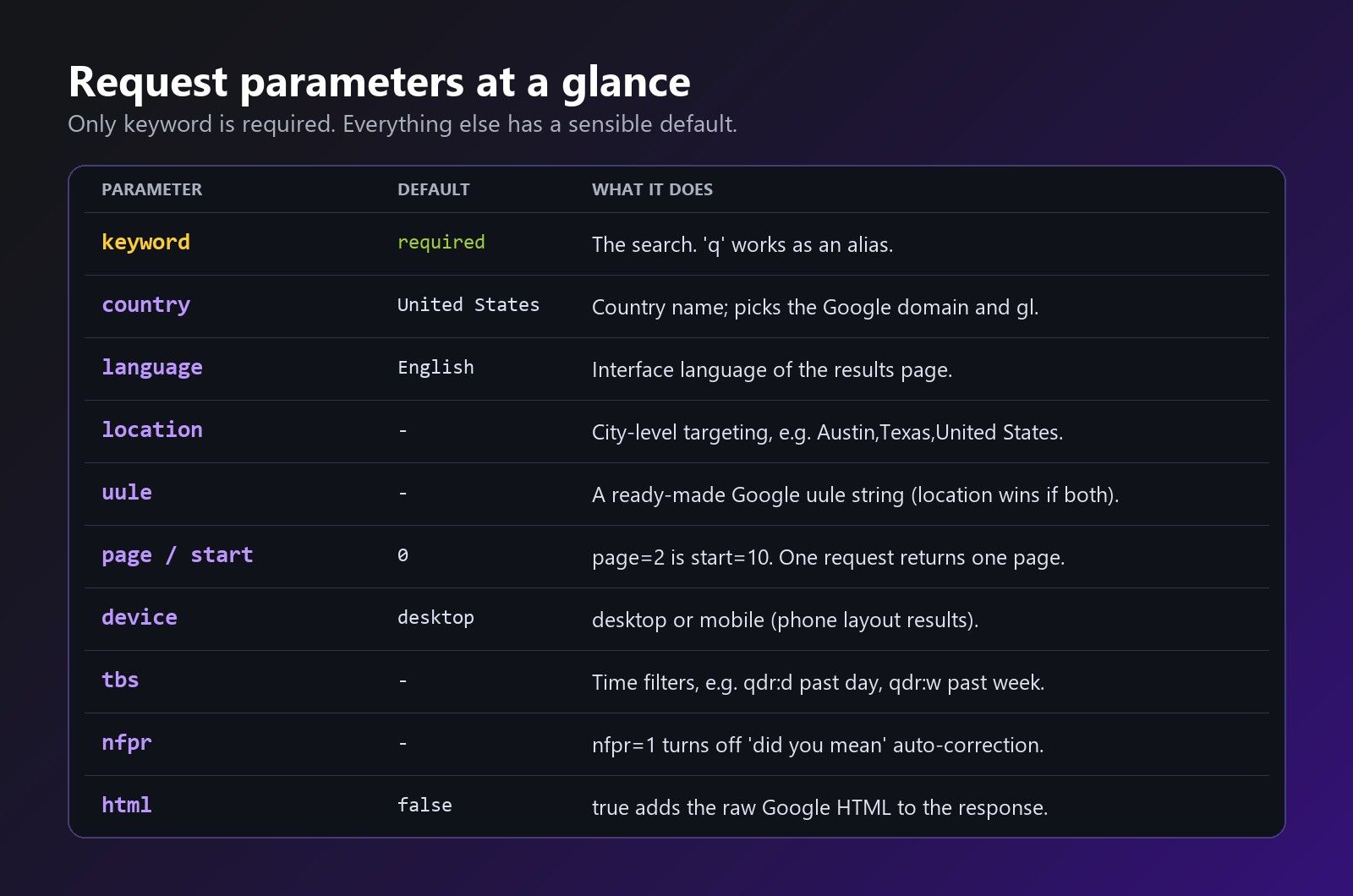
country (default "United States") chooses the country Google domain and market, and language (default "English") sets the interface language. Both take full names.
const data = await search("assurance auto", {
  country: "France",
  language: "French",
});
Local results with location
For "near me" searches, a country is too coarse. location targets a city, using Google's canonical place name in the form City,Region,Country:
const data = await search("plumber near me", {
  location: "Austin,Texas,United States",
});
If you already generate Google uule strings yourself, pass one as uule. When both are present, location wins.
Pagination with page and start
One request returns one page of about ten results. Ask for page: 2 and JustSERP converts it to start=10 for you. You can also set start directly. Here is a loop that collects the first three pages and de-duplicates links:
const seen = new Set();
const rows = [];

for (const page of [1, 2, 3]) {
  const data = await search("project management software", { page });
  for (const item of data.organic_results ?? []) {
    if (!seen.has(item.link)) {
      seen.add(item.link);
      rows.push(item);
    }
  }
}

console.log(rows.length, "unique results");
Each page is its own request, so each page uses one API call.
Mobile results
Rankings differ between desktop and phones. Set device: "mobile" to get the phone version of the results page.
const [desktop, mobile] = await Promise.all([
  search("pizza delivery", { device: "desktop" }),
  search("pizza delivery", { device: "mobile" }),
]);

console.log("Desktop #1:", desktop.organic_results[0].link);
console.log("Mobile  #1:", mobile.organic_results[0].link);
Time filters with tbs
tbs is passed to Google as it is, so any Google time filter works. The common ones are qdr:h (past hour), qdr:d (past day), qdr:w (past week), qdr:m (past month) and qdr:y (past year).
const news = await search("openai announcement", { tbs: "qdr:d" });
Exact queries with nfpr
Google sometimes "corrects" an unusual query, such as a brand name or a typo you meant to keep. Send nfpr: "1" to turn auto-correction off and get results for exactly what you typed. Send it as a string, not a number.
const exact = await search("justserp", { nfpr: "1" });
Raw HTML with html
Set html: true to receive the Google page itself in an html field, next to the parsed data. This is handy for storing evidence or parsing a block we do not extract yet. It makes responses much larger, so leave it off otherwise.
import { writeFile } from "node:fs/promises";

const data = await search("local bakery", { html: true });
await writeFile("serp.html", data.html);
The q alias
If you are porting code from another SERP tool, q works as an alias for keyword.
Handling errors
Check the HTTP status before you read the body. These are the answers you will meet:
| Status | Meaning | What to do |
|---|---|---|
200 | Success. One API call is used. | Read the results. |
400 | Invalid parameters. message says which. | Fix the request. Do not retry it unchanged. |
401 | The API key is missing or invalid. | Check the X-API-Key header. |
429 | You have no API calls left. | Top up or upgrade your plan. |
500 | The page could not be fetched or read. No call is used. | Retry after a short pause. |
Only successful (200) requests use a call, so retrying a failure never costs you. Here is a wrapper that retries server errors and network failures with a growing delay:
class JustSerpError extends Error {}

const sleep = (ms) => new Promise((resolve) => setTimeout(resolve, ms));

async function searchWithRetry(keyword, options = {}, retries = 3) {
  for (let attempt = 0; attempt <= retries; attempt++) {
    try {
      const response = await fetch(API_URL, {
        method: "POST",
        headers: { "X-API-Key": API_KEY, "Content-Type": "application/json" },
        body: JSON.stringify({ keyword, ...options }),
        signal: AbortSignal.timeout(30_000),
      });
      if (response.status === 200) return await response.json();
      if ([400, 401, 429].includes(response.status)) {
        throw new JustSerpError(`${response.status}: ${await response.text()}`);
      }
    } catch (err) {
      if (err instanceof JustSerpError) throw err; // do not retry these
      // timeout or network error: fall through and retry
    }
    await sleep(2 ** attempt * 1000); // 1s, 2s, 4s, 8s
  }
  throw new JustSerpError(`Gave up on "${keyword}" after ${retries + 1} tries`);
}
Running many searches at once
Each search takes only a few seconds, and running them in parallel multiplies your throughput. Your plan sets how many requests can be in flight at once (10 on the Free and Personal plans, 25 on Business, 50 on Enterprise), so keep your worker count at or below that number. A small worker pool does the job without any extra packages:
async function mapWithLimit(items, limit, fn) {
  const results = new Array(items.length);
  let next = 0;
  const workers = Array.from({ length: limit }, async () => {
    while (next < items.length) {
      const i = next++;
      results[i] = await fn(items[i]);
    }
  });
  await Promise.all(workers);
  return results;
}

const keywords = ["crm software", "email marketing tool", "invoice app", "seo checker"];

const results = await mapWithLimit(keywords, 5, async (keyword) => {
  try {
    const data = await searchWithRetry(keyword);
    return { keyword, count: (data.organic_results ?? []).length };
  } catch (err) {
    return { keyword, error: err.message };
  }
});

console.table(results);
Putting it together: a rank tracker
This script checks where your domain ranks for a list of keywords in a given city, over the first three pages, and writes a CSV:
import { writeFile } from "node:fs/promises";

const DOMAIN = "example.com";
const KEYWORDS = ["plumber austin", "emergency plumber", "water heater repair"];

async function findRank(keyword) {
  for (const page of [1, 2, 3]) {
    const data = await searchWithRetry(keyword, {
      page,
      location: "Austin,Texas,United States",
      nfpr: "1",
    });
    for (const item of data.organic_results ?? []) {
      if (item.link.includes(DOMAIN)) return (page - 1) * 10 + item.position;
    }
  }
  return null;
}

const lines = ["keyword,rank"];
for (const keyword of KEYWORDS) {
  const rank = await findRank(keyword);
  lines.push(`"${keyword}",${rank ?? "not in top 30"}`);
}
await writeFile("ranks.csv", lines.join("\n") + "\n");
Tips
- Call the API from the server, never from browser code, so your key stays private.
- Store the key in an environment variable, never in a repository.
- Always set a timeout with
AbortSignal.timeout()so a stuck request can never hang your script. - Cache results you will reuse. A repeated search is a repeated call.
- Default optional blocks with
?? []. Google does not show ads, knowledge panels or videos on every page.
Next steps
That is all you need to put Google data into your JavaScript tools. Create a free account for 2,000 free requests, no credit card needed, and try the examples above, or see the pricing when you are ready to scale. Prefer Python? Read the Python version of this guide.