Desktop vs Mobile Google Rankings: Compare Them with Python
The same keyword can return a different order, different URLs and even different data on desktop and mobile. Here is why, plus a Python script that searches both devices and prints an overlap and rank-shift table.

Run the same keyword on desktop and on a phone and Google can hand back a different order, a different set of URLs, and even a different shape of data: our mobile responses never include inline_videos or totalResults. So which ranking goes in your report? Both, side by side. Below is a Python script that searches each keyword on both devices, compares the two lists, and prints an overlap and rank-shift table you can use for SEO reporting.
Why desktop and mobile rankings differ
There is no single cause, and Google does not publish a full list, so treat the following as common reasons rather than rules.
- Different page layouts. Phone results use a different layout with different features. Blocks such as ads, People Also Ask, maps or videos take different amounts of space, which shifts where organic results land.
- Mobile usability. A page that is slow or awkward on a phone can rank differently there than on desktop.
- Intent. Many phone searches are local or immediate, and results for such queries often lean toward nearby and quick answers.
- Different data on the phone page. Mobile results come back without
inline_videosand withouttotalResults, so any report that leans on those fields only works for desktop. - Normal variation. Results also shift between runs, so a small difference is not always a real signal. This is why the script below reports an overlap measure as well as positions.
The practical takeaway is simple: a single "average position" hides these differences. Measuring each device separately turns a vague feeling that "mobile is different" into a list of specific keywords and pages you can act on. Which device matters more depends on your audience, so check your own analytics to decide where to look first.
What you need
- Python 3.9 or newer and the
requestspackage (pip install requests). - A JustSERP API key. Sign up and copy it from your dashboard, then keep it in an environment variable and call the API from your server or script, never from browser code.
export JUSTSERP_API_KEY="your-key-here"How the comparison works
JustSERP takes a device parameter, "desktop" or "mobile"; any other value is a 400. The script sends the same keyword twice, once per device, and then compares the two organic_results lists. Each organic result has a position that restarts at 1 on every page, so within a single page it is the rank you want.
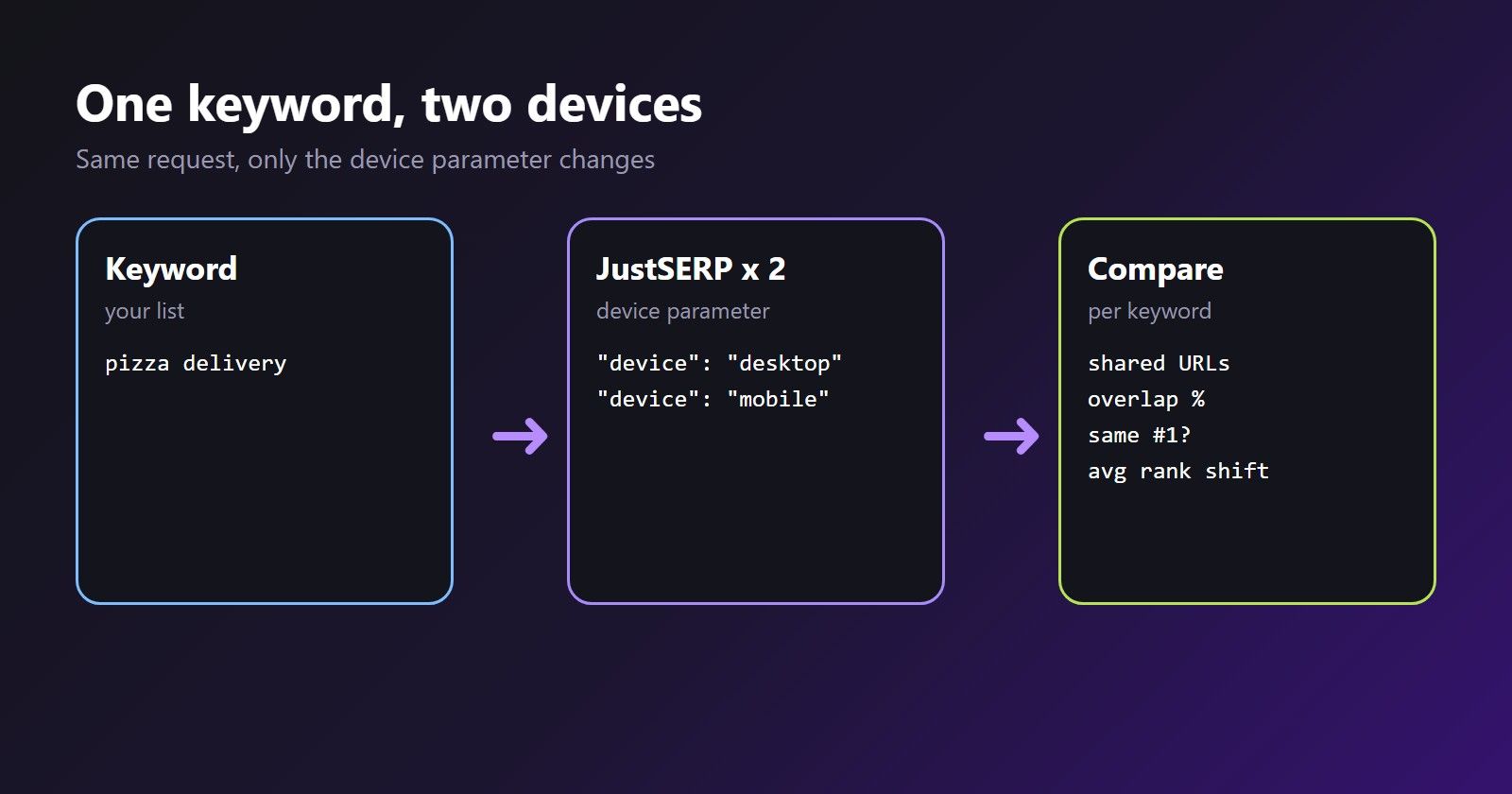
For every keyword it calculates:
- Shared URLs: how many URLs appear on both devices.
- Overlap: shared URLs divided by the number of desktop results.
- Same #1: whether the top result is identical.
- Average rank shift: the average absolute position difference across the shared URLs.
- Your domain: your rank on each device, and the gap between them.
The script
Save this as compare_devices.py. The two device requests for a keyword run in parallel, and server errors are retried with a short delay. The timeout is 90 seconds because a hard query can take over a minute when Google pushes back and we retry before giving up. If your client hangs up first, the call is still counted and you get nothing back.
import os
import time
from concurrent.futures import ThreadPoolExecutor
from urllib.parse import urlparse

import requests

API_URL = "https://api.justserp.com/v1/search"
API_KEY = os.environ["JUSTSERP_API_KEY"]

MY_DOMAIN = "example.com"
KEYWORDS = ["pizza delivery", "project management software", "running shoes"]
OPTIONS = {"country": "United States", "language": "English"}


def search(keyword, device, retries=3):
    """Return the organic results for one keyword on one device."""
    for attempt in range(retries + 1):
        try:
            response = requests.post(
                API_URL,
                headers={"X-API-Key": API_KEY},
                json={"keyword": keyword, "device": device, **OPTIONS},
                timeout=90,
            )
            if response.status_code == 200:
                return response.json().get("organic_results", [])
            if response.status_code in (400, 401, 429):
                raise RuntimeError(f"{response.status_code}: {response.text}")
            # any other status (for example 500): not charged, so retry below
        except requests.Timeout:
            # a timed-out request is still counted, so do not hammer it
            raise RuntimeError(f"Timed out on '{keyword}' ({device})")
        except requests.RequestException:
            pass  # network error: retry below
        time.sleep(2 ** attempt)
    raise RuntimeError(f"Gave up on '{keyword}' ({device})")


def normalize(url):
    """host + path without 'www.' or a trailing slash, so URLs compare cleanly."""
    parts = urlparse(url)
    host = parts.netloc.lower().removeprefix("www.")
    return host + parts.path.rstrip("/")


def rank_map(results):
    ranks = {}
    for item in results:
        ranks.setdefault(normalize(item["link"]), item["position"])
    return ranks


def domain_rank(results, domain):
    for item in results:
        host = urlparse(item["link"]).netloc.lower().removeprefix("www.")
        if host == domain or host.endswith("." + domain):
            return item["position"]
    return None


def compare(keyword):
    with ThreadPoolExecutor(max_workers=2) as pool:
        desktop_job = pool.submit(search, keyword, "desktop")
        mobile_job = pool.submit(search, keyword, "mobile")
        desktop, mobile = desktop_job.result(), mobile_job.result()

    d_ranks, m_ranks = rank_map(desktop), rank_map(mobile)
    shared = set(d_ranks) & set(m_ranks)
    shifts = [abs(d_ranks[u] - m_ranks[u]) for u in shared]

    return {
        "keyword": keyword,
        "shared": len(shared),
        "overlap": len(shared) / len(d_ranks) if d_ranks else 0.0,
        "same_top": bool(desktop and mobile and normalize(desktop[0]["link"]) == normalize(mobile[0]["link"])),
        "avg_shift": sum(shifts) / len(shifts) if shifts else 0.0,
        "my_desktop": domain_rank(desktop, MY_DOMAIN),
        "my_mobile": domain_rank(mobile, MY_DOMAIN),
    }


def fmt(rank):
    return "-" if rank is None else str(rank)


rows = [compare(keyword) for keyword in KEYWORDS]

print(f"{'keyword':32} {'shared':>6} {'overlap':>8} {'same #1':>8} {'avg shift':>10} {'desktop':>8} {'mobile':>7}")
for row in rows:
    print(
        f"{row['keyword']:32} {row['shared']:>6} {row['overlap']:>8.0%} "
        f"{'yes' if row['same_top'] else 'no':>8} {row['avg_shift']:>10.1f} "
        f"{fmt(row['my_desktop']):>8} {fmt(row['my_mobile']):>7}"
    )
A few details worth knowing. normalize ignores www. and trailing slashes so the same page is not counted as two. rank_map keeps the first position when a URL appears twice. A - in the last two columns means your domain was not in that page of results. Server errors such as a 500 are not charged, so retrying them costs nothing, while a timeout on your side still counts as a call, which is why the script stops on one. Each keyword uses two calls, one per device. country and language take full English names like "United States" or "Germany"; a code such as "US" quietly falls back to United States and English, and still uses a call.
Reading the output
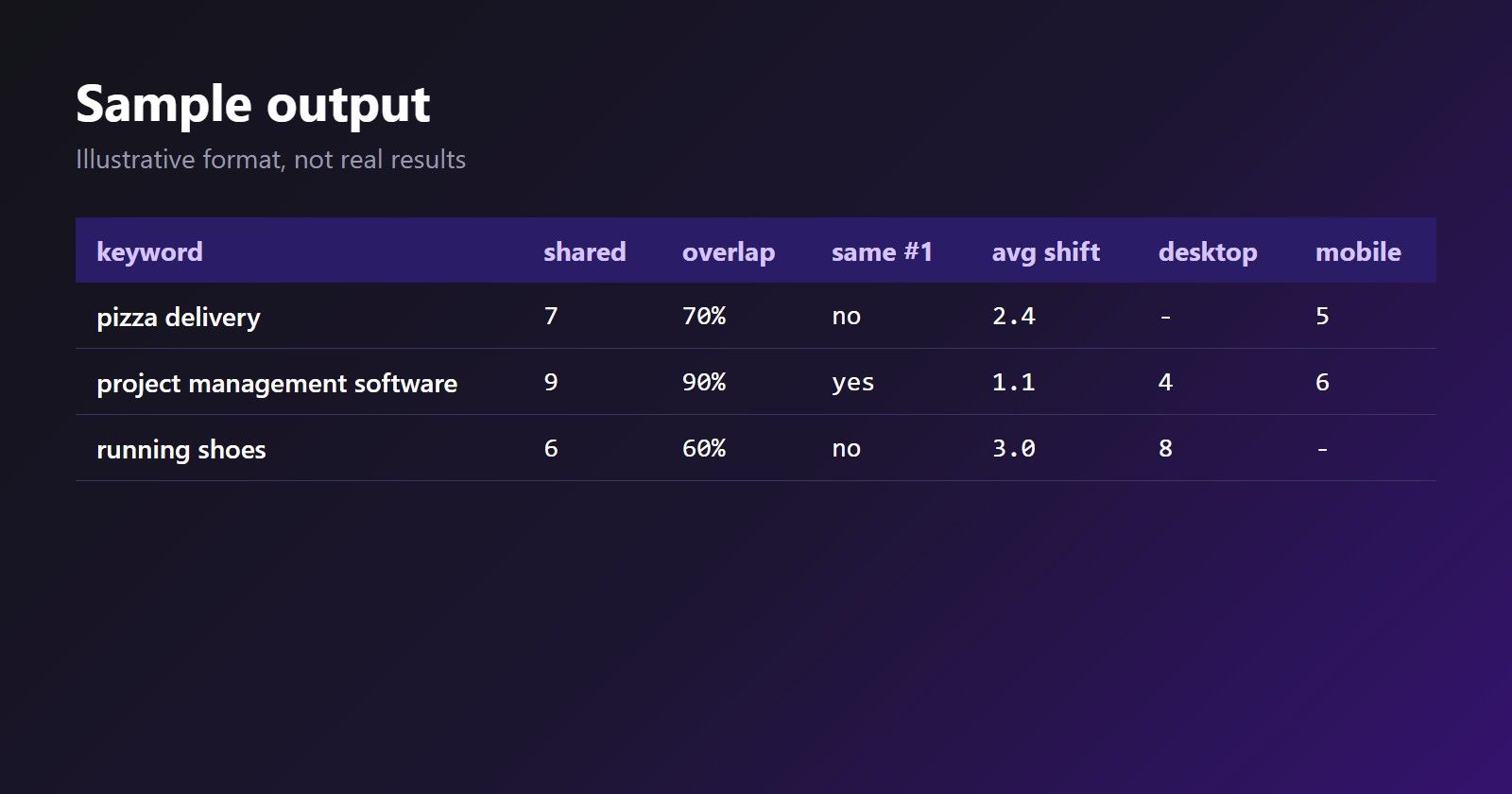
You get a table like this. The numbers below are only an illustration of the format, not real results:
keyword                          shared  overlap  same #1  avg shift  desktop  mobile
pizza delivery                        7      70%       no        2.4        -       5
project management software           9      90%      yes        1.1        4       6
running shoes                         6      60%       no        3.0        8       -
How to interpret each column:
- Low overlap means the two devices show quite different sets of pages. Investigate those keywords first.
- A high average shift with high overlap means the same pages, in a different order.
- A desktop-only or mobile-only rank for your domain is the most actionable finding: you are visible on one device and missing on the other.
Going further
Three small changes make the script more useful for real tracking:
- Add a city. For local keywords, add
"location": "Austin,Texas,United States"toOPTIONS. We turnlocationinto Google'suuleparameter exactly as written and do not validate it, so a misspelled place is not rejected: Google ignores it and you get non-local results on both devices. Use Google's canonical "City,Region,Country" names, and checkmeta.googleURLif the results look generic. Local differences between devices are often larger than national ones. - Look deeper than page one. Add
"page": 2in another request.positionstarts again at 1 on every page, on mobile too, so the overall rank is(page - 1) * 10 + position, assuming the page held ten organic results. Each page is one more API call, andpageoverridesstartif you send both. - Save results over time. Write the rows to a CSV with the date, then chart each keyword's gap week by week. One snapshot can be noise; a trend is a finding.
Common pitfalls
- Comparing different settings. If country, language or location differ between the two requests, the gap you see is not about the device. The script reuses one
OPTIONSdictionary for both for that reason. - Treating missing as zero. A
-only means your domain was not on the page you fetched. It might sit on page two, so fetch more pages for important keywords before you call it a loss. - Comparing URLs that redirect. If two devices show different URLs for the same content, such as a separate mobile address, the overlap will look lower than it is. Check the actual links when overlap is surprisingly small.
- Reading too much into ads. The script measures organic results only. Paid results come back separately in
paid_ads, one list in page order with no top or bottom flag, so you can compare how many ads each device shows but not where they sat.
What to do with it in SEO reporting
- Report both devices. Show desktop and mobile rank side by side instead of one blended number, so a drop on one device is not hidden.
- Prioritize by gap and value. Start with keywords where you rank on one device and not the other, and that matter to the business.
- Check the page on a phone. When mobile rank is worse, look at speed, layout and whether content or structured data differs from desktop.
- Do not over-read one run. Rerun a few times or track over days before acting on a small difference.
- Segment by intent. Local and quick-answer queries are more likely to differ than informational ones, so group your keywords before drawing conclusions.
Tips
- Keep the key in an environment variable and run the script server-side.
- Keep concurrency within your plan. Two parallel requests per keyword is a modest load; if you parallelize across keywords too, stay within your plan's concurrency limit.
- Do not expect
totalResultsorinline_videoson mobile. Read them with.get()so the same code works for both devices. - Use the same options on both devices so the only variable is the device.
- Cache and store results instead of re-searching for each report.
Next steps
You can run this comparison today. Create a free account for 2,000 free requests with no credit card, drop in your own domain and keywords, and see the pricing when you want to track at scale. New to the API? Start with our Python guide, and if you are weighing whether to build a Google scraper yourself, read scraping Google yourself vs a SERP API.